FREE GUIDE
AI for Product Managers
97% of product managers say AI made them faster. Only 64% say it made the product better. Here is how to close that gap.
Get the free guide
97% of product managers say AI made them faster. Only 64% say it made the product better. Here is how to close that gap.
Get the free guide Where AI changes the product, not just the pace.
AI does two things in a product week. It changes how fast you produce work, and it changes what you decide. Only the second moves the product. This guide covers five places the week goes wrong, and names what the tool cannot do in each.
Written by Alesia Kunz, who has spent 17+ years doing this job as a product manager and product owner. She is Product Manager at Ironum and CEO of LearnSlice, the company behind it. Every figure is traced to whoever published it: Product Focus, Germany's federal employment research institute (IAB), Eurostat, the OECD and Microsoft's own documentation. Nothing is estimated.
Get the free guide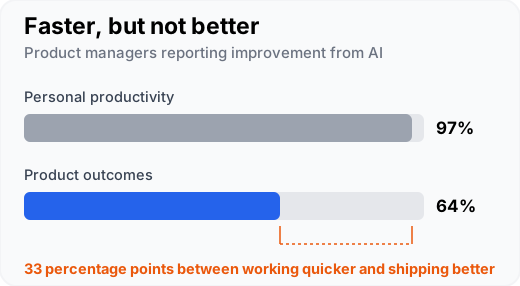
Sharpening the questions before a customer interview beats drafting faster. The guide works through five places in a product week where AI is worth the time: the plan that never survives Wednesday, knowing your users better than the people using the product, prioritization when everything is important, the writing that fills most of the week, and the metric that moved the day before the meeting.
Two sources feed any answer: the public web, and your organization's own content. Which of the two Copilot can reach depends entirely on your license, and many people who find Copilot useless are on one that cannot read their work.
| Tier | Can it see your files and mail? |
|---|---|
| Copilot Chat (Basic) | No. Web data only. It sees your work if you paste it, upload it, or have it open in Teams or Outlook. |
| Microsoft 365 Copilot (Basic) | Not in chat, but Copilot works inside Word, Excel, PowerPoint and OneNote. |
| Microsoft 365 Copilot (Premium), the paid add-on | Yes, automatically, through Microsoft Graph, and only for files you already have permission to open. |
Two products share the word Basic, which is where most of the confusion starts. The guide shows how to check which one you are on.
Microsoft's own prompt framework has four parts: goal, context, expectations and source. The prompt pack is written that way and is copyable as it stands, with the parts you change marked. Most prompts return something you still have to decide on, which is the point.
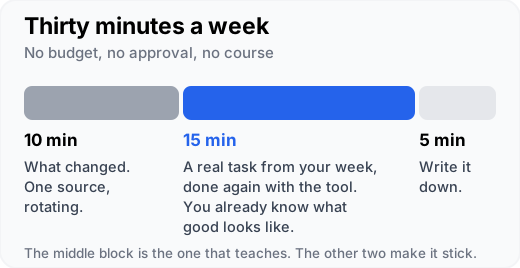
Every chapter ends with a first step you can take this week, and the last part is a weekly routine that costs nothing and needs nobody's approval. Do it on your own real work, which is the only way to tell whether the output is any good. If you lead a product team, a separate section covers how to run it across the team.
Most of the guide is method, and method is yours to fix. Some limits are not: a tool that cannot read your tickets, documents or research cannot ground its answers in them. Connecting a model to those systems, with the same permissions people already have, is a solvable engineering problem, and it does not have to mean sending your data abroad.
This is the work Ironum does: private RAG and custom AI on your own data, hosted in the EU or on your own infrastructure. When a model can read your research notes, tickets and metrics directly, it can answer "what did customers actually say about onboarding this quarter" across all of them, not just the three interviews you pasted, and cite where each answer came from.
If you have hit one of these limits, write to Alesia with the limit and the system your data lives in. She replies herself, within two working days, with whether it is solvable and roughly what it would take. No sales sequence follows.
Ask whether your limit is solvableAI for product managers, 26 pages. The download opens straight away. We do not email you the file.
AI for product managers, 26 pages. The twenty-minute path starts on page three.
Download the PDFKeep the link. It does not expire, and forwarding it to a colleague is fine by us.
Check what your license exposes in Copilot Chat under Settings, then Sources. As a rule: Copilot Chat on the basic tier answers from web data and from whatever you paste, upload, or have open in Teams or Outlook. Only the paid Microsoft 365 Copilot Premium add-on reaches your own files and mail by itself, through Microsoft Graph, and only files you already have permission to open.
Copilot Chat on the basic tier reaches web data only. It sees your work if you paste it, upload it, or have it open in Teams or Outlook. Microsoft 365 Copilot additionally works inside Word, Excel, PowerPoint and OneNote. Only the paid Premium add-on reaches your own files and mail by itself, through Microsoft Graph, and only for files you already have permission to open.
Three questions settle most cases. Which account am I signed into, work or personal? Would I put this in an email to a supplier? Is it someone else's personal data, such as customer names, recordings, or support tickets with identities in them? Your own company policy overrides all three.
Microsoft states in its own guidance that the same prompt used several times can return different responses. One good answer therefore does not prove the prompt was good. Keep a prompt only once it has produced a usable answer more than once, on different inputs.
It is free and the download opens straight away. We do not email the file to you, and downloading starts no sales sequence. Besides your email and role, the form asks which kind of help would be useful, and your answer decides nothing about the download.
The companion guide: refinement, ordering and sprint goals, and where AI stops.
Read moreWhat to paste, what must never go in, and the refinement work AI genuinely does.
Read moreAI that answers from your own Jira, Confluence and documents, deployed on infrastructure you control.
Read more